

Summarize this post with AI
Most operators who want better reporting assume they must replace their system first. They do not. Property management system integration can add a visibility layer on top of the PMS you already run, using read only access, scheduled data refresh, and no migration project. This guide explains how the connection works, who owns the source of truth, how often data should refresh, and what to confirm with your PMS vendor before you start. It also covers the risks that sink these projects.
Property Management System Integration:
A reporting or visibility layer connects to a PMS through its property management API, a scheduled export, or a vendor approved interface, using read only access so the PMS stays the source of truth. No migration is needed: the layer copies and maps data such as units, leases, work orders, and ledgers, refreshes it on a schedule, and reports on it separately. Confirm access terms with your PMS vendor, define the field mapping and refresh rate up front, and reconcile totals against the PMS every week.
What is a PMS integration?
A PMS integration is a connection that moves data between your property management system and another tool. The PMS holds leases, units, tenants, work orders, and accounting records. The other tool might be a dashboard, an AI assistant, or a finance system. The connector is sometimes called a data connect layer. It reads from the PMS, translates the data into a common structure, stores it, and serves reports.
A visibility layer is a read only integration. It never changes your PMS records, which is why it carries far less risk than a migration.
Three terms matter most.
API: a defined way for software to request data from another system
Mapping: the rules that link fields in the PMS to fields in your reporting model
Source of truth: the system whose record wins when two systems disagree
Teams buying property management reporting software should ask how it handles all three, because the answers decide whether reports can be trusted.
Discover the Future of AI-Driven Property Management
Why it matters now
Many portfolios run more than one system after acquisitions, and each owner wants the same weekly numbers. Replacing every PMS to get one view is slow, costly, and disruptive to staff and residents. Vendors have opened integration programs to meet this demand. Yardi describes a standard interface program with more than 450 partners, including interfaces that let third parties pull work orders and pull resident, unit, lease, and property data, as shown on its interface partners page.
AppFolio offers its API to approved partners through a program where companies apply, as set out on its partner page. Access is controlled by the vendor, so terms and approval matter. The reason to act is practical. Spreadsheet reporting breaks as portfolios grow, and decisions get made on stale numbers. The data challenges behind this are covered in our piece on proptech consulting and where data decides outcomes. Clean, connected data also unlocks AI use cases that need live inputs. Our overview of multifamily AI and where it helps operators shows why integration comes before automation.
Comparison table: five ways to connect to a PMS
Integration method | How it works | Data freshness | Effort and risk | Best for |
Read only API connection (visibility layer) | A connector pulls data through the vendor API or approved interface | Hourly to near real time where supported | Low to medium, PMS left untouched | Operators who want reporting without migration |
Scheduled export (SFTP or flat file) | The PMS exports files on a schedule and the layer loads them | Daily or slower | Low, but fragile if file formats change | Finance and month end reporting |
Direct database access | The layer queries the PMS database | Near real time | High, often not permitted, can affect PMS performance | Rare cases with explicit vendor approval |
Manual exports and spreadsheets | Staff download reports and combine them | As old as the last export | Low setup, high ongoing labour and error | Very small portfolios |
Full PMS migration | The PMS is replaced and history moved | Depends on the new system | High, long, and disruptive | When the PMS no longer fits the business |
For most operators the first row is the right starting point. If you are weighing platforms, our property management software comparison walks through evaluation criteria.
For a view on how a modern platform differs from older systems, read CORA versus traditional property management software.
The seven step process for a read only integration
Follow the same seven steps for every system you connect.
Define the questions. Start with five to ten metrics, such as vacancy loss, backlog age, and collections, so you know which data you need
Inventory the sources. List each PMS, the modules in use, and any other tools that hold related data
Confirm access. Ask the vendor how third parties connect, what approval and fees apply, what rate limits exist, and whether read only access can be granted. Scoped authorisation commonly follows the OAuth 2.0 framework, which lets a third party obtain limited access to a service
Map the data. Link PMS fields to your reporting model, define keys, and align status values. Data integration consulting services often start here, because mapping errors cause most reporting disputes
Set the data refresh. Match cadence to the decision being made, as explained below
Name the source of truth. Record which system owns each data type, and write the rule down
Reconcile and monitor. Compare totals with the PMS every week and alert on failed loads. Many teams hand this run work to a provider through digital transformation managed services
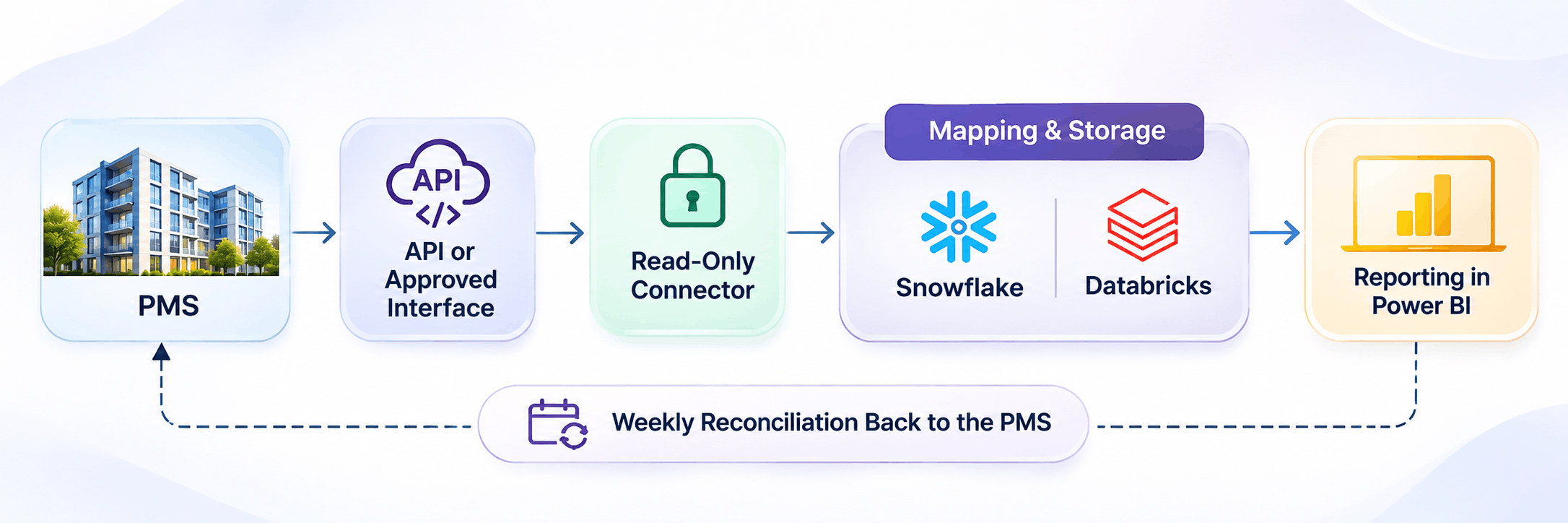
A simple mapping example
Mapping is easier when you start with entities.
Property and unit: one record per building and per unit, with a stable ID from the PMS
Lease and tenant: start date, end date, rent, and status, using the PMS status list
Work order: open date, close date, category, priority, and vendor
Ledger: charges, payments, and balances by period
Write down every status value and what it means. A unit marked ready in one property and vacant in another will break any vacancy report.
How often should data refresh?
Match data refresh to the decision, not to what is technically possible.
Finance and collections: daily is usually enough
Maintenance and work orders: hourly or near real time helps dispatch
Leasing and availability: near real time where the vendor supports it
Portfolio review: daily or weekly snapshots are fine
Faster refresh costs more and increases load on the PMS, so use it only where speed changes an outcome. Always show a last updated time on every report.
Who owns the source of truth?
The PMS owns transactions. The visibility layer owns derived metrics.
Corrections are made in the PMS, then flow through on the next refresh
The layer never writes back unless a separate, approved process exists
If numbers differ, the PMS wins and the mapping is checked
Each data type has a named owner
This rule prevents the most common dispute, which is two dashboards giving two answers.
Where the engineering sits
Connected data is usually landed in a governed store such as Snowflake or Databricks and reported through Microsoft Power BI. Samta.ai acts as the engineering execution layer for that work, and its PropTech AI consulting services describe how the pieces fit.
On the product side, CORA AI driven property management software is designed to bring operations data into one view. The wider CORA property management platform adds portfolio reporting and alerts. Confirm which PMS connectors are live for your system during a demo.
Measure Your AI Readiness with a Free Assessment
Real world use cases
These are illustrative scenarios based on common portfolio patterns, not client results.
Regulated owner example. A bank or insurer owns residential rental assets and reports to a board. It needs consistent numbers without risking the PMS that runs daily operations. A read only layer gives the board one view, keeps an audit trail of what was loaded and when, and leaves the PMS untouched. Data pipelines of the kind described under enterprise AI engineering in Singapore support this kind of controlled design.
General operator example. An operator acquires a portfolio that runs on a different PMS from its own. Migrating both would take a long time. Instead, it connects each system through a read only layer and maps both to one reporting model. Weekly metrics, such as those in our guide to the property maintenance report, now compare like with like across both estates.
For measured outcomes from real deployments, review the Samta.ai case studies before setting targets.
Key risks and failure modes
Integration projects stall for predictable reasons.
Assuming access is automatic. Vendors control API access, approval, and fees, so confirm terms first
Skipping the mapping work. Mismatched status values and IDs produce reports nobody trusts
No named source of truth. Without a rule, every discrepancy becomes an argument
Over refreshing. Constant pulls add cost and can slow the PMS for staff
No reconciliation. If totals are never checked against the PMS, errors persist unnoticed
Weak security scope. Broad credentials create risk, so use the narrowest read only permissions available
No owner after launch. Connectors fail quietly when vendors change formats, so someone must watch them
When to add a visibility layer, and when to migrate instead
Add a visibility layer when:
Your PMS works for operations but reporting is slow or manual
You run more than one PMS and need a combined view
Migration would be too disruptive or costly right now
You want to add AI or analytics on top of existing data
Consider migration when:
The PMS cannot meet core operational needs
The vendor will not allow third party access on workable terms
Contract renewal gives you a natural point to change
Discover Where Your AI Models Are Most Exposed
Conclusion
Better reporting rarely needs a new PMS. It needs clear access, careful mapping, a sensible refresh rate, and a firm rule on the source of truth. Start with read only access, reconcile weekly, and name an owner for the connection. Samta.ai and its CORA product are built around that approach, so you can see the whole portfolio without a migration.
About Samta
Samta.ai is a Singapore-headquartered AI Product Engineering & Data Intelligence partner helping enterprises build production-grade AI systems for regulated and data-intensive environments.We help organizations move beyond experimentation by engineering scalable, explainable, and enterprise-ready AI solutions from data foundations and model development to workflow automation and deployment.
Our capabilities combine deep AI expertise, data engineering, and product engineering to deliver measurable business impact across FinTech, BFSI, cybersecurity, regulatory technology, and enterprise operations.
Our enterprise AI products power real-world intelligence systems:
• TATVA : AI-driven data intelligence platform for governed analytics, monitoring, and operational insights
• VEDA : Explainable and audit-ready AI decisioning engine built for compliance-sensitive enterprise workflows
• CORA-Property Management Solutions: : Predictive intelligence platform for real-estate pricing, portfolio optimization, and investment analytics
Backed by ecosystem partnerships with Microsoft, Databricks, Snowflake, and AWS, Samta.ai delivers agile, cost-efficient AI engineering with faster turnaround and enterprise-grade scalability. Trusted by enterprises across FinTech, BFSI, and digital transformation initiatives, Samta.ai embeds AI governance, data privacy, and compliance-by-design principles directly into the AI lifecycle , enabling organizations to scale AI with transparency, accountability, and operational control.
Enterprises leveraging Samta.ai automate 65%+ of repetitive data, analytics, and decision workflows while maintaining governance, explainability, and measurable business outcomes. Samta.ai provides the strategic consulting, AI engineering, and data modernization expertise needed to align enterprise operations with next-generation AI transformation goals.
Frequently asked questions
How do reporting tools connect to a PMS?
Reporting tools connect through the PMS vendor's API, an approved interface, or scheduled file exports, using read only credentials. A connector pulls data, maps it to a reporting model, stores it, and serves dashboards. The PMS remains untouched, and access terms depend on the vendor and your licence.
How often does data refresh?
It depends on the connection and the decision. Finance data usually refreshes daily, maintenance data hourly or near real time, and portfolio snapshots daily or weekly. Faster refresh costs more and loads the PMS, so choose cadence by need, and show a last updated time on every report.
Who owns the source of truth?
The PMS owns transactions such as leases, charges, and work orders. The reporting layer owns derived metrics. If numbers differ, the PMS wins and the mapping is checked. Record this rule in writing and name an owner for each data type so disputes are resolved quickly.
Can a reporting tool connect to Yardi and AppFolio without migration?
Generally yes, because both vendors run integration programs for approved third parties, and a read only layer does not require moving your data. Access depends on vendor approval, your licence, and the terms offered. Confirm access, fees, and permitted data before you commit to a tool.
What is read only access in a PMS integration?
Read only access lets a connected tool view and copy PMS data without changing it. It cannot edit leases, post charges, or delete records. It is the safest starting point for reporting, and you should request the narrowest scope the vendor allows.